
| Apr 18, 2026
Checklist for Building HIPAA Compliant Websites
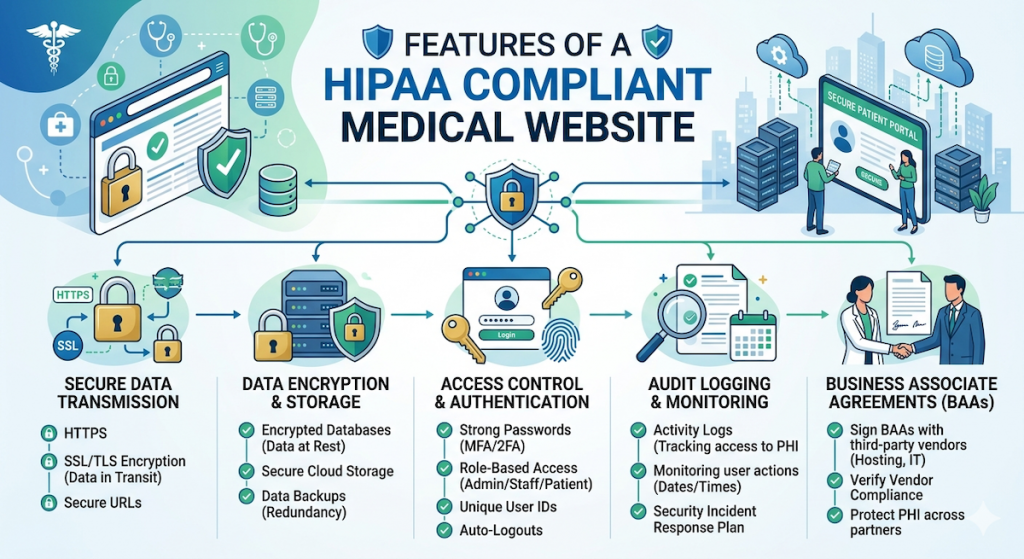
Building a HIPAA-compliant website is about protecting a patient’s Protected Health Information (PHI). This includes anything that can identify a person, such as their name, phone number, medical history, or even their appointment time. For high-growth healthcare platforms, the website must act as a “Hardened Security Machine” designed to handle appointments and patient records while keeping the “privacy shield” intact. To be compliant, ensure that this data is handled with integrity i.e. it is kept private, safe from hackers, and only seen by the right people.
Here is a basic checklist that popular healthcare platforms use to ensure its systems have total Integrity.
1. The Legal Foundation
A HIPAA compliant website must be backed by:
- Signed Business Associate Agreements (BAA): The healthcare platform must sign individual BAAs with providers of its hosting environment (like AWS), email providers (like WorkSpace), database services, marketing automation software (like HubSpot), cookie management systems (like OneTrust), etc. This is a legal contract where both sides promise to protect patient info in accordance with HIPAA rules.
2. Website Technical Security
Here are some requirements for HIPAA compliant websites:
- Cookie Management: Establish a website cookie banner up, with all non-strictly-necessary cookies held back from firing until after the visitor has affirmatively consented/accepted the cookies.
- Data Capture: For any section/page of the website where a visitor enters personal information or makes an appointment, use tools like GTM to remove all non-strictly-necessary passive tracking irrespective of acceptance of a banner. Some guidelines: (a) Home Page / About / Careers / Mission are a general “signal” only, so tracking is permissible. (b) Conditions / Treatment Pages signal “health intent, so it’s best to anonymize tracking. (c) Appointment / Login Pages contain “Direct PHI”, so all tracking must be removed. (d) Patient Portal is considered “Data Integrity” zone, so all tracking is prohibited and must be removed.
- No PHI in URLs or Query Parameters: Because it ends up in server logs, browser history, referrer headers, and analytics tools. Use Post method for anything that includes patient headers.
- No PHI in Plain Text: Including in application logs, error messages, debug outputs, etc.
- Tracking Pixels: Since platforms like Google Ads, Facebook (Meta) Ads, TikTok Ads and other ad platforms generally don’t sign BAAs, they are not HIPAA compliant on sites that collect PHI data. Care should be taken to ensure that these scripts are not rendered on any pages that perform any form of data capture.
- Encryption at Rest: All patient data (names, birthdays, symptoms) must be encrypted while it sits in the database. If a hacker broke in or stole your servers, all they would see is gibberish.
- Encryption in Transit via SSL/TLS: When a patient books an appointment on their phone, their data must travel through a secure, encrypted “tunnel” (SSL/TLS 1.3) to reach the server. Never use standard “Contact Us” forms for medical info.
- Encryption Strength: HIPAA-compliant websites must utilize at least 2048-bit RSA or 256-bit ECDSA keys, AES-256 bit depth for data protection, and SHA-256 or higher for hashing to avoid “system failures” associated with outdated algorithms.
- Automated Certificate Renewal: Since a lapsed certificate is a “catastrophic failure”, use a system like Let’s Encrypt with auto-renewal or an enterprise manager to ensure the tunnel never closes.
- Clear Privacy Policy: Your website must have a clear page explaining how you protect patient data and what their rights are.
3. Other Non-Web Administrative Safeguards
Beyond the website, HIPAA mandates broader organizational and back-office systems compliance issues like:
- Audit Logs: The system must keep a permanent “signal” of every action. If an employee looks at a patient’s record, the system records who looked, what they saw, and when they did it.
- Automatic Log-off: If a doctor or scheduler walks away from their computer, the website/app must automatically log them off after a few minutes to prevent “unauthorized access.”
- Integrity Checks: The system must regularly check its own data to make sure it hasn’t been altered or corrupted by a “system failure.”
- Unique User IDs: No two employees should share a login. Every person has their own “unique key” to enter the system.
- Strong Passwords: Require all staff to use long, complex passwords and Two-Factor Authentication (2FA).
- No PHI in Notifications: When Luna sends you a text or an email, it should say, “You have a new message in your portal,” rather than “Your physical therapy for your back is at 2:00 PM.” Keeping the details behind a login is the only way to stay compliant.
- Secure Portals: All actual medical talk happens inside a “perfected” secure portal, never through basic, unencrypted emails and texts. Use a professional service (like Google Workspace or Microsoft 365) specifically configured for HIPAA.
- Backup System: You must have a secure way to back up your data in case of a “system failure” or a natural disaster.
- Designate a Privacy Officer: There must be one person in the company whose “job” is to watch over security and make sure no “noise” or leaks occur.
- HIPAA training
- Workforce authorization
- Contingency plans
- Risk management plans
- Completion and documentation of risk assessment
- Security incident procedures
- Breach response process documentation
- Off boarding checklist
- Conducting access review regularly
- Training records maintained
- Internal audit schedule
If you are seeking a healthcare marketing agency, view our capabilities and consider partnering with us.